Posts

Showing posts with the label CI

Jenkins-out of memory

Image
Sometime, It will occur error while CI do a build job.As the following message. jenkins java.lang.OutOfMemoryError: Java heap space Before, when it occurred.I always thought that was the Java environment problem.Therefore my workaround is restart service. Honestly, I am not understanding Jenkins enough, a little bit lazy myself and so not seriously to find the answer. Workaround The default RAM setting is 256MB which can be found in the setup directory "jenkins.xml".As below image, I modify the value to 1024MB. Reference https://stackoverflow.com/questions/5936519/how-to-give-jenkins-more-heap-space-when-it%C2%B4s-started-as-a-service-under-windows

Jenkins-Parameterized Build Sub-flow

Image
Our CI Server has a set of jobs as below: In the daily build job, Once "01-Web" being finished then will trigger "02-Database" and "03-WebTest" Requirement After "01-Web", we want to control the other two jobs whether to be built. 01-Web --> 02-Database -->03-WebTest (default) 01-Web --> 02-Database 01-Web --> 03-WebTest 01-Web

Jenkins - Passing parameter to downstream job

Image
Preface There is a testing job which if being triggered by upstream job then will delay about 30 seconds but manually is not need. Workground 1.The upstream job use plugin "Trigger parameterized build on other projects" In this example, I naming a boolean parameter which is "WAITING"

Trigger Jenkins from VSTS

Image
For work requirement.Our daily build job needs to build immediately when the code was check-in. How To 1.Jenkins Job Select the Trigger option ps: If the option cannot found which means that you didn't installed the plugin.   Team Foundation Server Plug-in 2.VSTS Add Jenkins of Service Hook 3.Setting the project watched and trigger condition 4.Setting Jenkins Infomation The root URL of Jenkins. Login username and password. Choosing job which needs to build。 Reference https://www.visualstudio.com/en-us/docs/marketplace/integrate/service-hooks/services/jenkins#trigger-jenkins-from-visual-studio-team-services

Jenkins-PowerShell set fail while exception occurred.

Image
  When upgraded Jenkins Power Shell Plug in 1.3 version.Due to it runs Non-Interactive.Therefore, it always reports success no matter some exception occurred. https://wiki.jenkins.io/display/JENKINS/PowerShell+Plugin When an exception occurred that to be considered as a failure, you have to add some check condition as below.

Jenkins Remote Build - 2

Image
Continuing previous article " Jenkins Remote Build ".That mention the job can be triggered from URL directly.Under this premise is you've logged on Jenkins.In my sample that used Http Request Plugin then got the 403 error.So that we need passing the user credential with the request. 1.Getting User API Token

Jenkins Remote Build

Image
 My colleague asked a request whether trigger a job from other application.Finding the answer from google that Jenkins has the solution to do this.Which can use Http API to trigger a job. How To 1.Enabled Global Security If the option was not enabled that the remote trigger build cannot be bound in the second step. http://localhost:8080/configureSecurity/

Jenkins -TFS Get ChangeSet Number

Image
   The new request for CI Deploy.Which needs to get changeset number for after process.At first, I thought the only way is executing window batch command. tf changeset /latest /noprompt After referencing the help of TFS plugin that I just know it will get the variable of the TFS after a checkout.As below photo.

Console Program app.config trasform

Image
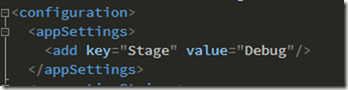
 I have a console app to some of the background tasks.I got some troubles with switch QAS stage and production stage.For that, I need to replace the app setting for difference machine.Therefore I write some codes to do thus to got my purpose.Today I saw an article to introduce to do that.I realize that I have done the stupid thing to deal with that thing.This article is for my regretted note. Auto transform App.config App.config add Stage setting,value= Debug