Posts

Showing posts with the label Jenkins

Jenkins - AzureDevOps trigger a job after push to git
Image
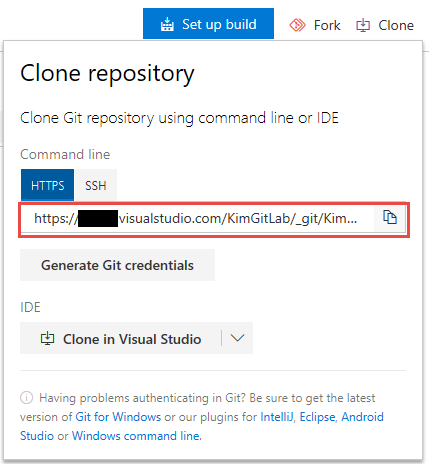
About Azure DevOps trigger a build job, which an article about TFS before. Recently, We are planning to transfer a source control from TFS to git. So I need to run the full scenario and note them. Azure DevOps Setting 1.Clone repository : Copy the clone URL. 2.Create a Personal Access Token This token will used by Jenkin. 3.Add a Service hook: Check-in build Project Settings>Service hooks  Choosing the type of trigger and repository. The User Name and API Token which created from Jenkins. ps:Integration Level needs choosing Build-in Jenkins API Jenkins Setting Source control:Enter the git, the clone URL, and the credentials which just adding from the git server. Reference https://docs.microsoft.com/en-us/azure/devops/service-hooks/services/jenkins?view=vsts

Jenkins- PowerShell include global config

Image
We have a PowerShell-script that will be referenced in many jobs at Jenkins.e.g. Retrieving a DataTable from the database. It will hard to maintain if this script in individual jobs. For this issue, I found a plugin can solve it How to setup 1.Install plugin-Managed Scripts 2.Jenkins Management,Enter the link of Managed files. 3.Add a new Config Name:For identification。 Content:Execute Script Way to use 1.Including the config which we just add it before.,Target:Output folder 2.Executing Power Shell Import-Module the config file in the output folder and call its function to get the count of records by SQL Reference Managed Script Plugin https://wiki.jenkins.io/display/JENKINS/Managed+Script+Plugin Power Shell Sql Query http://mattslay.com/sql-server-queries-using-powershell-lesson-1/

Trigger Jenkins from VSTS

Image
For work requirement.Our daily build job needs to build immediately when the code was check-in. How To 1.Jenkins Job Select the Trigger option ps: If the option cannot found which means that you didn't installed the plugin.   Team Foundation Server Plug-in 2.VSTS Add Jenkins of Service Hook 3.Setting the project watched and trigger condition 4.Setting Jenkins Infomation The root URL of Jenkins. Login username and password. Choosing job which needs to build。 Reference https://www.visualstudio.com/en-us/docs/marketplace/integrate/service-hooks/services/jenkins#trigger-jenkins-from-visual-studio-team-services