Posts

Jenkins - AzureDevOps trigger a job after push to git
Image
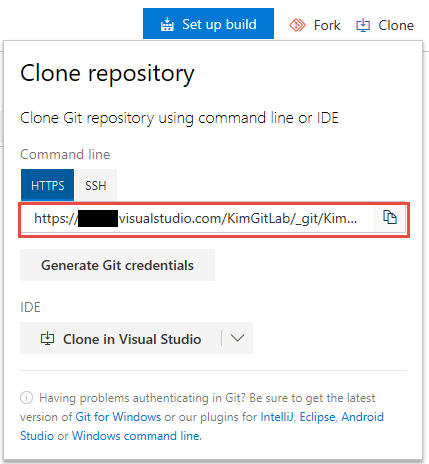
About Azure DevOps trigger a build job, which an article about TFS before. Recently, We are planning to transfer a source control from TFS to git. So I need to run the full scenario and note them. Azure DevOps Setting 1.Clone repository : Copy the clone URL. 2.Create a Personal Access Token This token will used by Jenkin. 3.Add a Service hook: Check-in build Project Settings>Service hooks  Choosing the type of trigger and repository. The User Name and API Token which created from Jenkins. ps:Integration Level needs choosing Build-in Jenkins API Jenkins Setting Source control:Enter the git, the clone URL, and the credentials which just adding from the git server. Reference https://docs.microsoft.com/en-us/azure/devops/service-hooks/services/jenkins?view=vsts

Blazor Hello world

Image
My colleague shared an article about ASP.NET Blazor how to implement "Web Assembly".Today, I try a classic sample, Of course, For new guys to enter the door  "Hello world" is the best choice. Setup Opening the extension tool to search the word "blazor"  you will find the package "ASP.NET Core Blazor Language Service".As you can see the name it means you need to be used ".Net core". Choose Project Template After installed, When we created a new project which will show more three templates. Basic Client Side Project,: Basically, this can run well but normally we will split it to client and backend so we don't use it. ServerAPI+Shared+Client Side: We use this,  it is the most standard layer architecture. Ps: Template 1 and 2 will load assembly to browser through blazor.webassembly.js to render HTML. ServerAPI+Shared+Server Side: This is similar No.2 the different is it will not load assembly to the browser.A...

VS2017.15.8.4 Error fixed

Image
Recently, I am a bit of fear to upgrade VS2017. Especially a major version was changed that every time will occur some error after installed. This time I  upgrade it from 15.7.x to 15.8.4.As expected all of my projects cannot be loaded. Workaground According to the message I head to the developer forum where I found the answer as below: 1. Run as administrator to open Developer Command. 2.Enter the following commands. gacutil /i "C:\Program Files (x86)\Microsoft Visual Studio\2017\Enterprise\MSBuild\15.0\Bin\Microsoft.Build.Framework.dll" gacutil /i "C:\Program Files (x86)\Microsoft Visual Studio\2017\Enterprise\MSBuild\15.0\Bin\Microsoft.Build.dll" gacutil /i "C:\Program Files (x86)\Microsoft Visual Studio\2017\Enterprise\MSBuild\15.0\Bin\Microsoft.Build.Engine.dll" gacutil /i "C:\Program Files (x86)\Microsoft Visual Studio\2017\Enterprise\MSBuild\15.0\Bin\Microsoft.Build.Conversion.Core.dll" gacutil /i "C:\Pro...

SQL Server pass parameter to Procedure

Today, My colleague mention his work which how to pass the parameter to the procedure. The workaround as below: 1.Declare a custom table type CREATE   TYPE   dbo . USER_TABLE_TYPE  AS   TABLE   (        USER_NO   VARCHAR ( 8 ) ) 2.C# Declare DataTable and SqlParameter      var   table =   new   DataTable();             table.Columns.Add( new   DataColumn( "USER_NO" , System.Type.GetType( "System.String" )));             table.Rows.Add(table.NewRow());             table.Rows[0][ "USER_NO" ] =   "Abc" ;               var   par =   new   SqlParameter             ...

IIS Block IP Setting

Image
We have two Web Server one for internal another for external. Now we consider let two into one. The main site will be opened a limited specific IP range, but some of the other sites will be opened to the public. How to 1.Add Features- IP and Domain Restriction After installed, It will show the icon in the root or subsites. 2.Setting IIS Root access from Allow to Deny. 3.IIS Root against specific IP range to open.e.g.The mask of the example as 255.255.255.0 it means from192.168.2.0~255 can be accessed. 4.Opening to the public by specific sites. Due to IIS Root has setting the deny. All of the sites will inherit this setting. After subsite modify its settings then it will base on a subsite. Therefore, it can be satisfied our request the deny is default but some allow. All of the settings are stored in the IIS config file. %windir%\System32\inetsrv\config\applicationHost.config Above-mentioned, ...

Jenkins- PowerShell include global config

Image
We have a PowerShell-script that will be referenced in many jobs at Jenkins.e.g. Retrieving a DataTable from the database. It will hard to maintain if this script in individual jobs. For this issue, I found a plugin can solve it How to setup 1.Install plugin-Managed Scripts 2.Jenkins Management,Enter the link of Managed files. 3.Add a new Config Name:For identification。 Content:Execute Script Way to use 1.Including the config which we just add it before.,Target:Output folder 2.Executing Power Shell Import-Module the config file in the output folder and call its function to get the count of records by SQL Reference Managed Script Plugin https://wiki.jenkins.io/display/JENKINS/Managed+Script+Plugin Power Shell Sql Query http://mattslay.com/sql-server-queries-using-powershell-lesson-1/

VS2017-Build fail-FindDependenciesOfExternallyResolvedReferences

Image
Recently, After installed the newest version of Visual Studio 2017 that occurred some of the following error messages: Software Infomation:Visual Studio 2017 Enterprise 15.7.4  (The problem since 15.6.x) Workaround I asked the help from forums the got temporary workaround as below: Opening file: C:\Program Files (x86)\Microsoft Visual Studio\2017\Enterprise\MSBuild\15.0\Bin\Microsoft.Common.CurrentVersion.targets Finding the red block highlight at below photo then remove it from the file. Reference https://developercommunity.visualstudio.com/content/problem/208668/the-finddependenciesofexternallyresolvedreferences.html

Jenkins-out of memory

Image
Sometime, It will occur error while CI do a build job.As the following message. jenkins java.lang.OutOfMemoryError: Java heap space Before, when it occurred.I always thought that was the Java environment problem.Therefore my workaround is restart service. Honestly, I am not understanding Jenkins enough, a little bit lazy myself and so not seriously to find the answer. Workaround The default RAM setting is 256MB which can be found in the setup directory "jenkins.xml".As below image, I modify the value to 1024MB. Reference https://stackoverflow.com/questions/5936519/how-to-give-jenkins-more-heap-space-when-it%C2%B4s-started-as-a-service-under-windows

VS2017 Msbuild Framework Error

Image
Issue After reinstalling my laptop, My web project that originally normal cannot be deployed.It shows errors Could not load file or assembly "Microsoft.Build.Framework" .

Python Hello World

Image
The first time to learn Python.According to tradition, let's try a "Hello World". 1.Setup-Window https://www.python.org/downloads/ Default setup. Add Python path to environment.. After finished, The default folder as below. C:\Python34

ng-controller dynamic load

Image
Basically, We use the ng-controller will declare as below. Now, We have an issue is that the ng-controller need to be injected dynamically, So that we can use different controllers, e.g. ng-controller="vm.GetConroller() as vm" ps: This code snippet cannot be run.

SQL Wave Char

Today, My colleague asked me a question that Entity Framework will generate SQL and has ESCAPE '~' at the end of the SQL. SELECT * FROM T WHERE Title LIKE 'foo%'  ESCAPE '~' After the survey, some of the article that the only things we knew it is ESCAPE are used to query the data has  Universal characters.There are no articles about "~".Through some of the testing, we found it represented all of the Universal characters.Which means you may be used ESCAPE '%_[^' to query has the data include it then you can just use ESCAPE '~' to replace it. SELECT * FROM T WHERE Title LIKE 'foo%'  ESCAPE '%_[]^' equal SELECT * FROM T WHERE Title LIKE 'foo%'  ESCAPE '~'

Jenkins-Parameterized Build Sub-flow

Image
Our CI Server has a set of jobs as below: In the daily build job, Once "01-Web" being finished then will trigger "02-Database" and "03-WebTest" Requirement After "01-Web", we want to control the other two jobs whether to be built. 01-Web --> 02-Database -->03-WebTest (default) 01-Web --> 02-Database 01-Web --> 03-WebTest 01-Web

Jenkins - Passing parameter to downstream job

Image
Preface There is a testing job which if being triggered by upstream job then will delay about 30 seconds but manually is not need. Workground 1.The upstream job use plugin "Trigger parameterized build on other projects" In this example, I naming a boolean parameter which is "WAITING"

RAM Disk 2017 My memo

Image
How to and Download This link can download the 4g RAM Version.Currently, official site just offer 1G version. https://pcrookie.com/?p=891 My personal use settings 1.Accelerating the speed of Visual Studio compiler - Changing temp folder path VisualStudio and IIS machine.config location as below: C:\Windows\ Microsoft.NET \Framework64\v4.0.30319\Config If your used IIS express C:\Windows\ Microsoft.NET \Framework\v4.0.30319\Config Opening the machine.config find<System.Web> scope then add as below    <compilation   tempDirectory="R:\Temporary   ASP.NET   Files\"/> ps: The difference is the first executed web page after compiled.

Stopping TypeScript Compile to accelerate debugging

Image
    Due to our project architecture that consists of much of typescript file. Every model or service or controller even a dto that there is an individual file each of them.Total files are 1000 files.     There are too many files in the project so that every time compiler needs waste much time to compile typescript.Today, I count the time is about 30 seconds.   Basically, It will output js file when press saves button but when you execute compiled it will output again and along with all typescript.I don't want to compile all of the typescripts at this situation.Therefore, I found a way to disabled typescript compiled

Host file and IIS binding not working

Image
Problem   Today, I'd like to simulate a DNS at my local site but I got some weird error. ERR_CONNECTION_REFUSED

Trigger Jenkins from VSTS

Image
For work requirement.Our daily build job needs to build immediately when the code was check-in. How To 1.Jenkins Job Select the Trigger option ps: If the option cannot found which means that you didn't installed the plugin.   Team Foundation Server Plug-in 2.VSTS Add Jenkins of Service Hook 3.Setting the project watched and trigger condition 4.Setting Jenkins Infomation The root URL of Jenkins. Login username and password. Choosing job which needs to build。 Reference https://www.visualstudio.com/en-us/docs/marketplace/integrate/service-hooks/services/jenkins#trigger-jenkins-from-visual-studio-team-services

Unable to launch the IIS Express Web server

Image
   After I finished my program that I tested it with press F5 and I got the error which is "Unable to launch the IIS Express Web server".In the past, My workaround is to restart Visual Studio if which is not working then I will restart the computer so that it can be work.     Every time I got this error that was affected my productivity.According to that, I decided to find the permanent solution to do that.

Jenkins-PowerShell set fail while exception occurred.

Image
  When upgraded Jenkins Power Shell Plug in 1.3 version.Due to it runs Non-Interactive.Therefore, it always reports success no matter some exception occurred. https://wiki.jenkins.io/display/JENKINS/PowerShell+Plugin When an exception occurred that to be considered as a failure, you have to add some check condition as below.
